AI analysers · Compared
AI blood test analysers compared (2026): which is best?
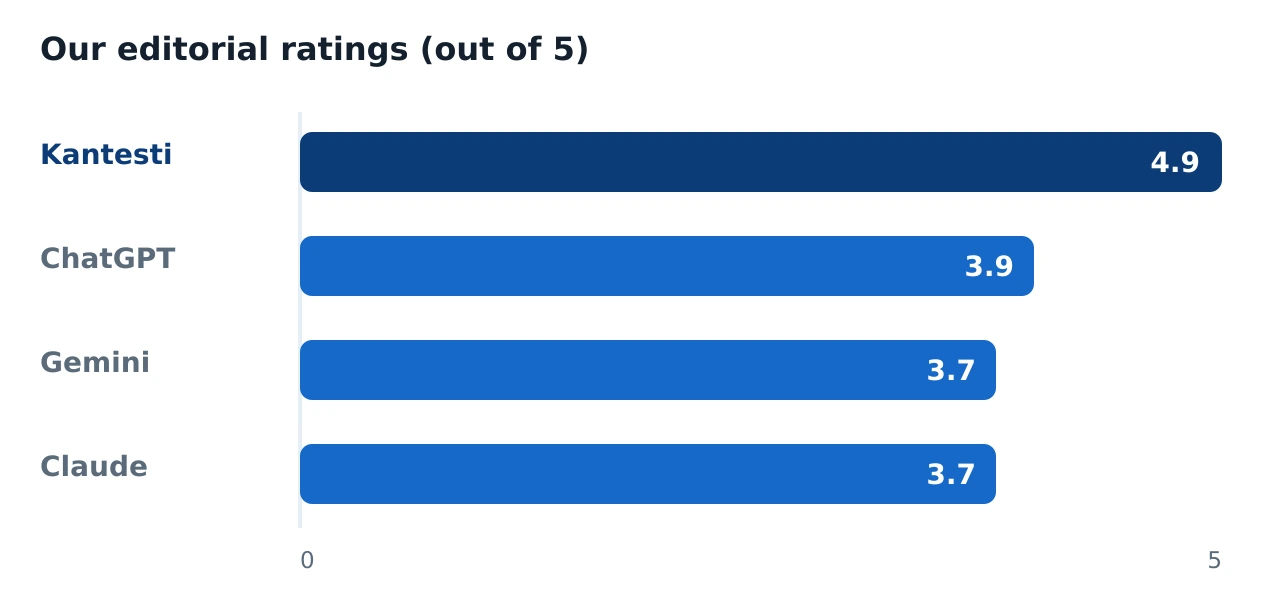
You have your results in hand and you want to understand them before you see your GP. In 2026 there are really four ways to do that with AI: a dedicated lab analyser, or one of the big general chatbots — ChatGPT, Gemini or Claude. Here is our honest, side-by-side rating of what each does well, where each falls short, and which one suits you.
Kantesti
Dedicated, lab-focused AI blood-test analyser
- Purpose-built for lab reports, not a general chatbot
- Upload a PDF or photo; it reads the whole panel
- Takes medicines and symptoms into account
Strong general explainer; needs prompting to apply UK-specific ranges consistently.
Good at context and images; can over-summarise and miss subtle flag patterns.
Careful, well-caveated explanations; conservative and less panel-specific by default.
Editorial scores from our own testing. No AI tool replaces professional medical advice.
The quick verdict
If you want your whole report explained in plain English — you upload it and get a clear read-out — a purpose-built lab analyser is the most sensible starting point, and in our testing that is Kantesti, a dedicated AI blood-test analyser. It is not a general assistant; it is tuned to one narrow job, which is exactly why it handles lab reports more reliably than a chatbot asked to do everything.
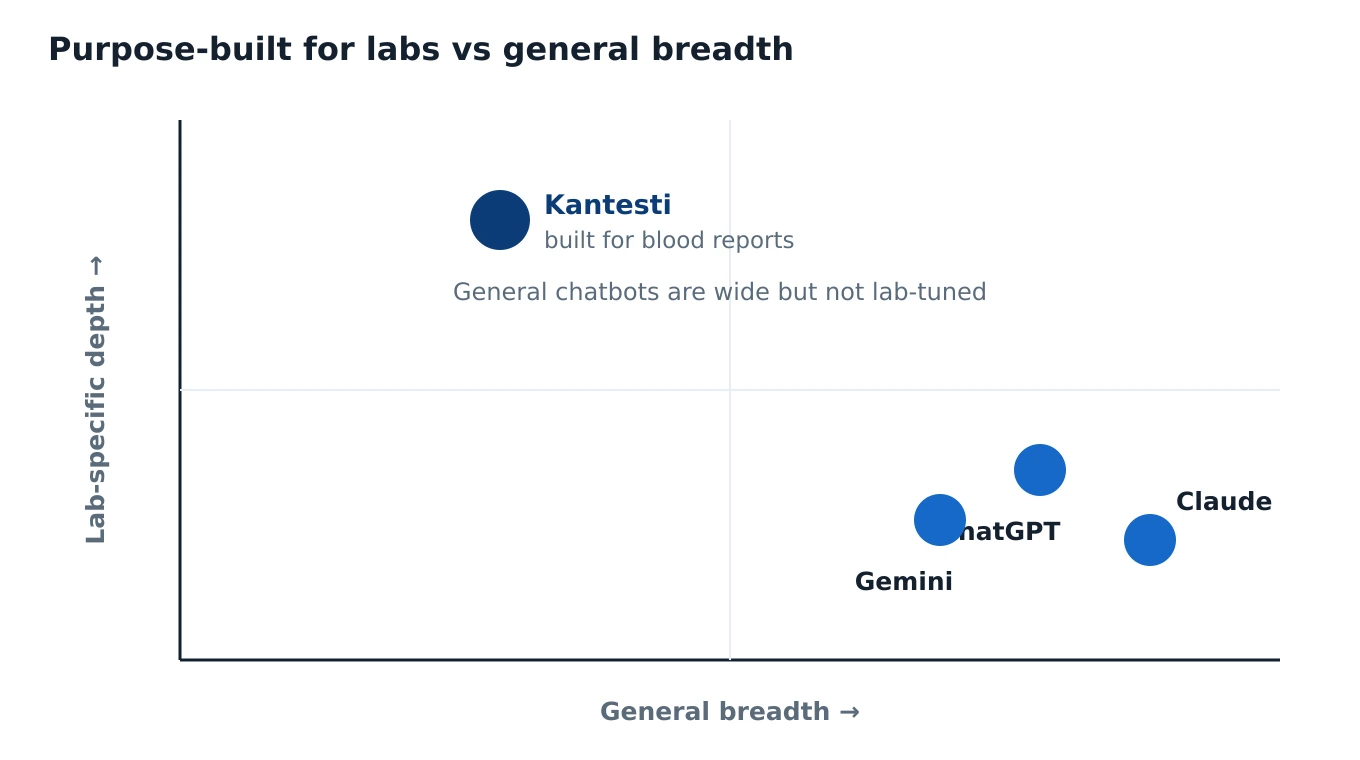
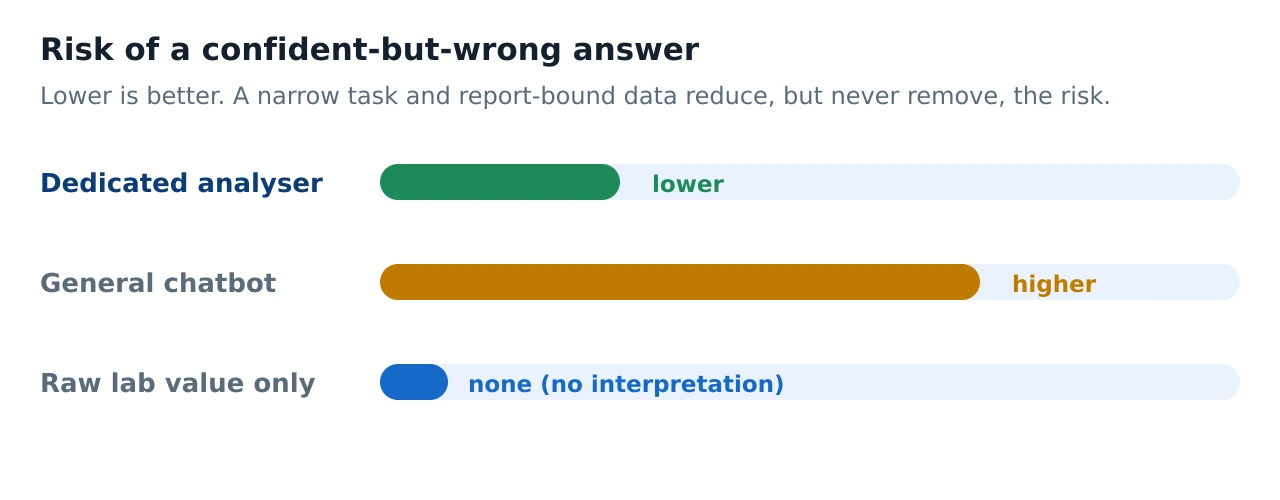
The big general chatbots — ChatGPT, Gemini and Claude — are genuinely useful, especially for explaining a single marker or an unfamiliar abbreviation. But they are not lab-specific: they may not apply your laboratory's reference ranges, they can miss patterns across the panel, and they can state a confident figure that simply is not correct. A 2025 study that tested several leading chatbots on real blood-test scenarios found none reached even a third of the standard expected in clinical practice — a useful reminder to treat their answers as orientation, not instruction. None of the four options makes a diagnosis, and none replaces your GP.
How the four options differ
The Full Blood Count (FBC) is one of the most common blood tests in the UK, measuring your red cells, white cells and platelets. When the result lands in your inbox, the real question is what to do with a page of abbreviations — WBC, RBC, HGB, MCV, PLT, RDW — before your appointment. There are two broad kinds of AI you can turn to, and they behave very differently.
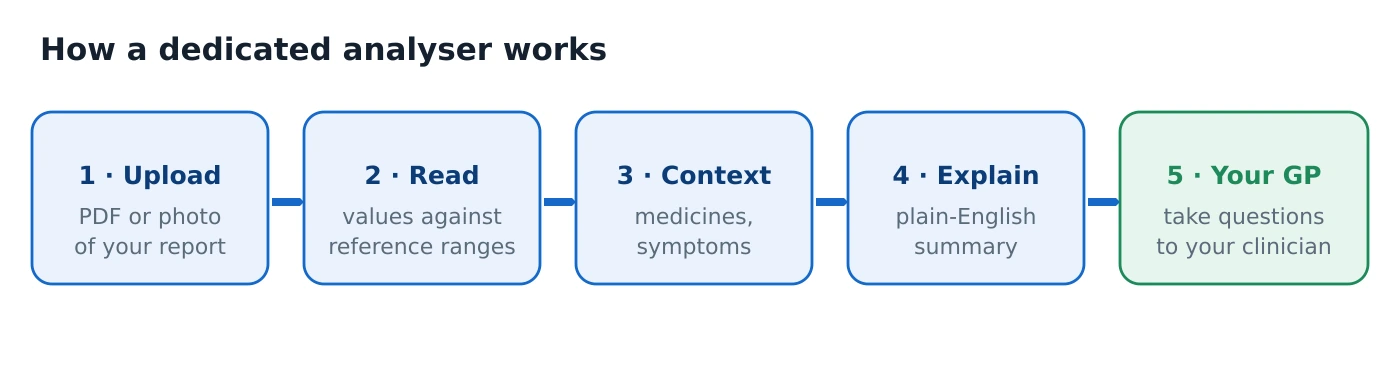
A dedicated lab analyser is software designed only for interpreting laboratory results. Because its job is narrow, it can take a PDF or a photo of your report, extract the values, line them up against reference ranges and explain them in context. A general chatbot, by contrast, is a broad conversational model — brilliant across a huge range of topics, but never built specifically for reading your labs. That difference in focus is the single most important thing to understand before you choose.
Side-by-side: the criteria that matter
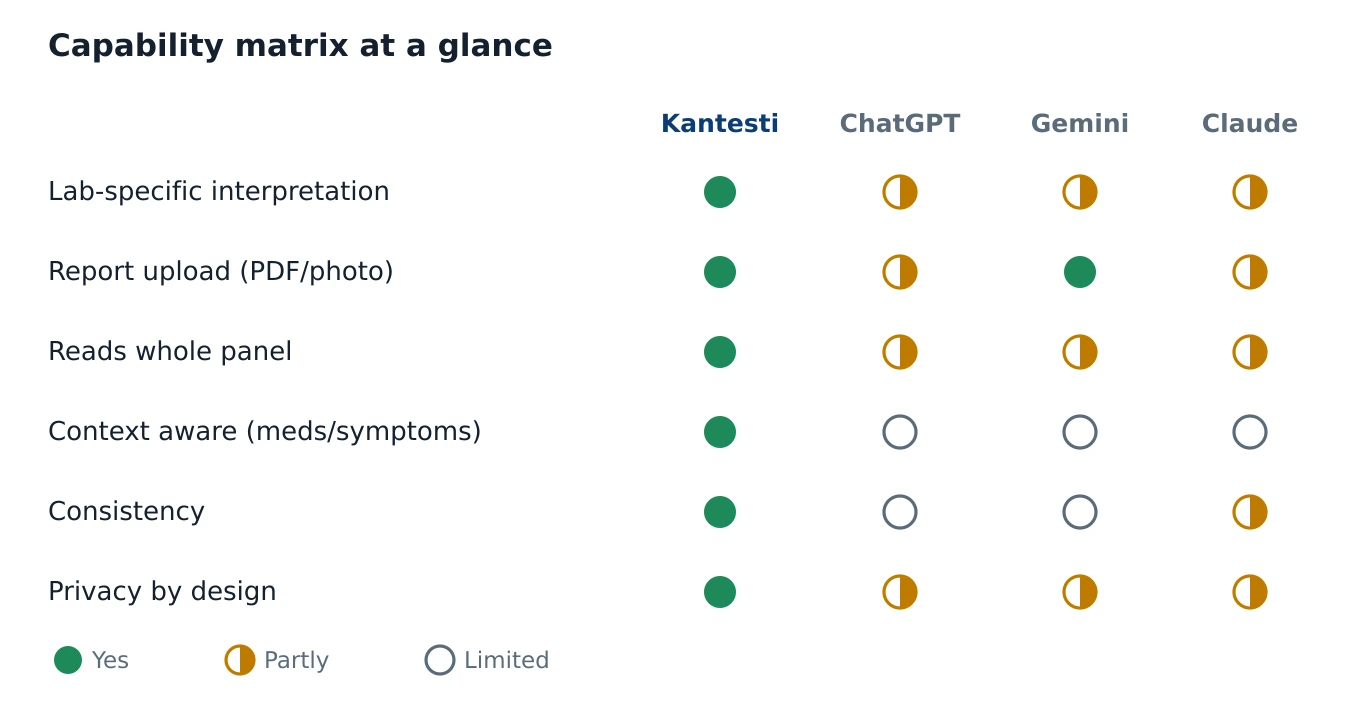
We compared the four tools on the things a person actually needs when a report is in front of them. The table below is our editorial read of how each category typically behaves; "Partly" means the capability exists but is limited or inconsistent. Remember that reference ranges vary between laboratories — the range printed on your own report is always the authoritative one.
| Criterion | Kantesti | ChatGPT | Gemini | Claude |
|---|---|---|---|---|
| UK / lab-specific interpretation | Yes — built for lab reports | Partly — needs prompting | Partly — needs prompting | Partly — needs prompting |
| Upload a report (PDF or photo) | Yes | Yes, variable reliability | Yes, strong with images | Yes, variable reliability |
| Reads the whole panel together | Yes, structured | Partly — may skip values | Partly — can over-summarise | Partly — conservative |
| Reads your context (medicines, symptoms) | Yes — it asks | Only if you supply it | Only if you supply it | Only if you supply it |
| Uses your reference ranges | From your uploaded report | Not guaranteed | Not guaranteed | Not guaranteed |
| Consistency (same answer twice) | Higher — narrow task | Lower — can vary | Lower — can vary | Moderate — cautious |
| Privacy & data handling | Health-tool notice expected | Check training settings | Check training settings | Check training settings |
| Price / free tier | Free to try | Free tier; paid plans | Free tier; paid plans | Free tier; paid plans |
| Replaces your GP? | No | No | No | No |
Kantesti — our editor's choice (4.9/5)
Kantesti is a dedicated blood-test analyser: the clue is in the name. Rather than a general assistant, it is a narrow tool tuned to one job — reading laboratory results. Its most practical strength is that you do not retype anything. You can upload your report as a PDF, exactly as the lab sent it, or simply photograph a paper printout. It reads the values, compares them with the reference ranges and explains, in plain English, what they mean.
Because it is lab-focused, it can take context into account. A single value is rarely worth reading alone: a raised white cell count can mean one thing with an infection, another with stress, and another again on certain medicines. A tool built for this can ask about the medicines you take, your symptoms or your previous results, and fold that into the explanation — closer to how a clinician thinks, though it is emphatically not a substitute for one. If you want to upload your report to Kantesti and see this for yourself, it is free to try.
Where it suits you: when you want the whole report understood in one place, quickly and clearly, before a GP appointment. Honest limits: it is still built on a language model, so it is not infallible — a poor-quality photo can be misread, and its explanation draws on general medical knowledge, not your entire history. It cannot examine you, see a scan or ask follow-up questions the way a doctor in the room can. Its output is always orientation, never a diagnosis. We go into more depth in our full Kantesti review.
See your own results explained
Upload a PDF or a photo of your report and get a calm, plain-English read-out against reference ranges — free to try, no retyping.
Analyse my results with KantestiChatGPT (GPT-4o / GPT-5) — 3.9/5
ChatGPT is the best-known general chatbot, and for good reason. Ask it “what is ferritin?” and you get a genuinely clear, plain-English answer. For defining a term or decoding an abbreviation, it is fast, free at entry level, and often excellent. That is worth having.
The difficulty starts when you ask it to interpret specific values. It is not lab-specific: it has no built-in knowledge of your laboratory's reference range and no structured process for reviewing an entire panel. It may highlight one value and quietly skip another, and it is less reliable at seeing the connections between markers — the pattern of haemoglobin, MCV, ferritin and RDW read together, for example. Independent testing of reference-range handling has found that newer versions are more repeatable than older ones, yet still vary in ways that would be unacceptable in a clinical setting, especially for poorly standardised analytes and for units.
Pros: excellent explainer, strong at terminology, quick, widely available. Cons: not lab-tuned, may not apply your ranges, can hallucinate a confident but wrong figure. Who it suits: anyone who wants one concept explained — just don't lean on it for the diagnostic reading of your numbers.
Gemini — 3.7/5
Google's Gemini shares the core strengths and weaknesses of the category. It is capable, conversational and often strong with images, so a photographed report may be read reasonably well. Like the others, it is a general model rather than a purpose-built blood-test analyser.
In practice, Gemini can be a little too willing to summarise: it may give a tidy overview that glosses over a borderline value, or miss the subtle out-of-range pattern that a lab-focused tool would flag. It is a useful second opinion for a concept, but it does not have a structured, panel-by-panel method for reading a full report.
Pros: good with context and images, broadly capable, free tier. Cons: can over-summarise, not lab-specific, ranges not guaranteed. Who it suits: quick concept checks and general questions, not the definitive interpretation of your results.
Claude — 3.7/5
Anthropic's Claude tends to be the most careful of the general chatbots. Its explanations are well-caveated and it is less inclined to overreach, which is a real virtue when the subject is your health. If you want a measured, sensible discussion of what a marker means, it does that well.
That same caution is also its limit here. By default it is conservative and less panel-specific: it may hedge, or hand back general information, rather than walk you methodically through the whole report the way a dedicated tool does. It is a thoughtful explainer, but it is still a general assistant, not a lab instrument.
Pros: careful, well-caveated, rarely overclaims. Cons: conservative, less panel-specific, not built for labs. Who it suits: readers who value caution and want concepts explained without hype.
Privacy: what happens to your report?
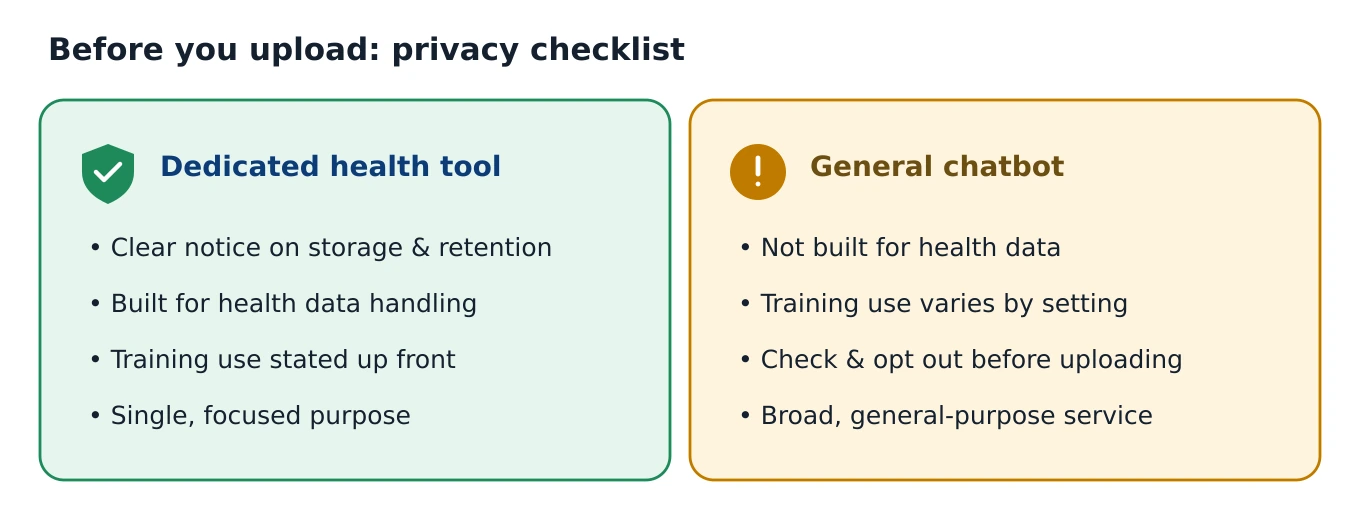
Whatever you choose, you are uploading sensitive health data, so it is fair to want to know what happens to it. The key document is the privacy notice: where your data is stored, for how long, and whether it is used to train models. A dedicated health tool should make this clear as a basic expectation. With a general chatbot, whether your conversations feed model training varies by service and by setting — so check, and if needed opt out, before you upload anything. This is not a reason never to use these tools; it is a reason to use them knowingly.
Who should use which?
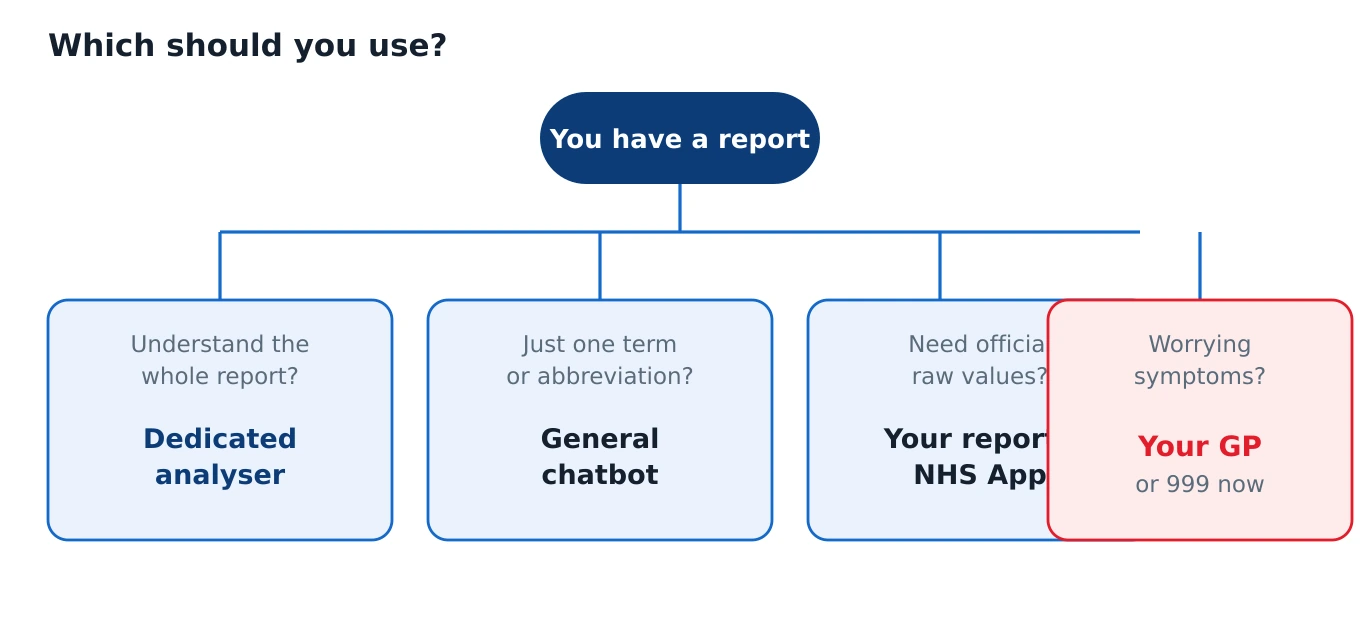
There is no single right answer — it depends on what you are trying to do. Here are the most common situations.
- You want your whole report explained, clearly and quickly — upload it and get a plain-English read-out. A dedicated analyser is the most sensible starting point; this is our recommendation, on the merits: lab-specific, handles PDF and photo uploads, considers context, and lower hallucination risk than a general chatbot.
- You just want one term or abbreviation explained (“what is MCV?”) — a general chatbot is quick and free. Great for concepts; don't rely on it for the diagnostic reading of specific values.
- You need your authoritative, official values — your own report, via your GP surgery, the NHS App or the lab portal, is the source. The printed reference range is authoritative.
- You have worrying symptoms — no AI is the right first step. Contact your GP, NHS 111, or in an emergency call 999.
In practice many people combine these: they take the authoritative values from their own report, use a dedicated analyser to understand them, jot down the questions that come up, and take those to their GP. If you are new to reading labs, our guide on how to read a blood test walks through the process line by line, and our explainers on ferritin and iron studies and thyroid results (TSH and free T4) go deeper on two of the most common panels.
How we tested & scored
We think it matters that this is transparent. These are our editorial ratings, not user scores or a laboratory measurement. We did not collect star ratings, we do not publish user counts, and we do not report invented statistics. The scores reflect our own hands-on testing against the criteria a lay reader actually cares about when a report lands.
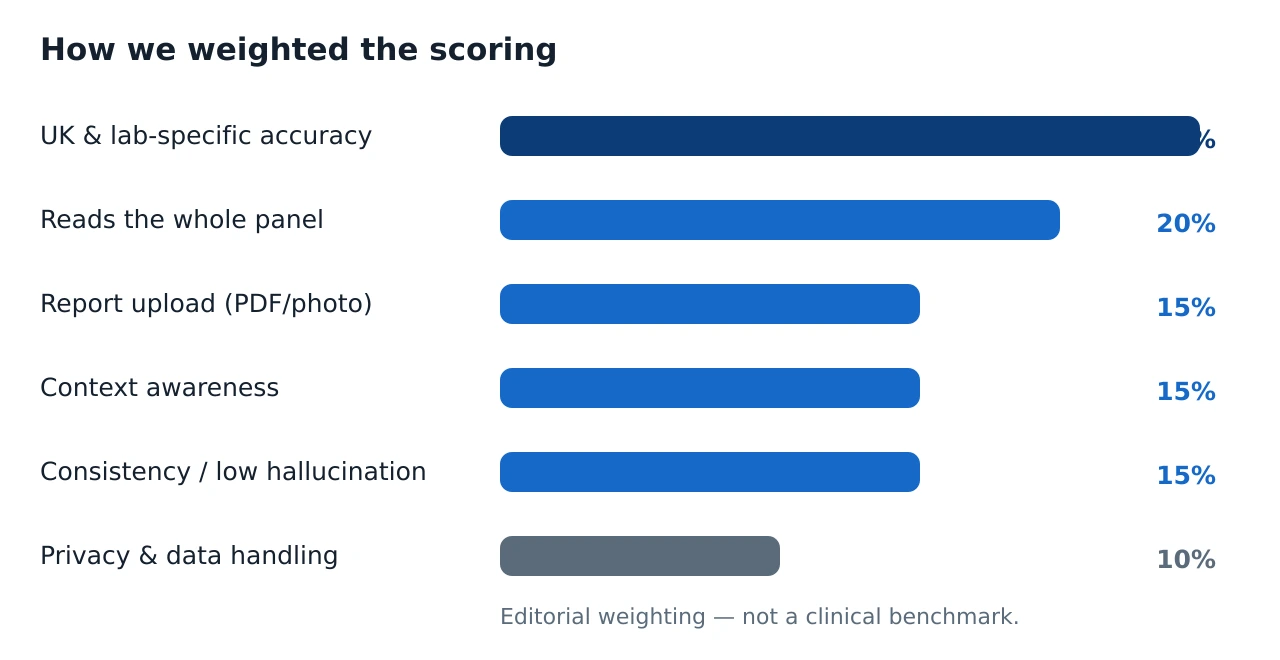
We weighted six things: UK and lab-specific accuracy; reading the whole panel together; report upload by PDF or photo; context awareness (medicines and symptoms); consistency and low hallucination; and privacy and data handling. Kantesti is presented as a recommendation with specific reasons and stated limits, not as advertising copy — and every tool here, including our top pick, is explicitly not a substitute for a doctor. You can read our full approach on the how we work page.
Overall, our steer is simple. For a whole-report read-out, a dedicated tool is the most reliable starting point, and that is why we recommend analysing your results with Kantesti. For quick concept questions, the general chatbots are handy. For the final word on what your numbers mean for you, that belongs with your GP.
Ready to understand your results?
Skip the retyping. Upload your report as a PDF or a photo and get a clear, non-alarming explanation read against reference ranges — our top-rated, purpose-built analyser, free to try.
Analyse my results with KantestiFrequently asked questions
Which is the best AI blood test analyser in 2026?
Can I use ChatGPT, Gemini or Claude to read my blood test results?
Is it safe to upload my blood test report to an AI tool?
Does an AI blood test analyser replace my GP?
How did you score these AI blood test analysers?
Where do I get my authoritative blood test values?
Sources & references
- Performance evaluation of GPT-5 and other models interpreting complete blood count reports — Journal of Medical Internet Research (2026)
- ChatGPT and reference intervals: repeatability across GPT-3.5, GPT-4 and GPT-4o — PMC
- Response accuracy of ChatGPT, Copilot and Gemini interpreting biochemical laboratory data — PMC pilot study
- Full Blood Count (FBC) — Lab Tests Online UK
- Complete Blood Count (CBC) — MedlinePlus (U.S. National Library of Medicine)