AI analysis
AI blood test analyzer (free): what it can and cannot do
A free AI blood test analyzer will translate your report into plain English in about a minute — which markers are outside range, what each one measures, and which values belong together. What it will not do, and should never claim to do, is hand you a diagnosis. Here is how these tools actually work, how to pick one, and how to use the output well.
Most people meet their blood test results alone: a PDF in an inbox, a line in the NHS App, or a printout handed over at the end of an appointment that has already run late. The numbers are there, the reference ranges are there, and almost nothing explaining what any of it means is there. That gap is exactly why AI blood test analyzer has become such a common search — and why "free" is almost always attached to it.
This guide explains what these tools genuinely do, what the free versions typically include, where their accuracy runs out, and how to get something useful out of one without drifting into self-diagnosis. If you would rather start with the numbers themselves, our companion guide on how to read a blood test walks through the report line by line.
- What it does
- Reads your values against their ranges and explains them in plain English
- What it does not do
- Diagnose, prescribe, or replace your GP
- Typical free tier
- Full panel read, limited number of reports
- Time it takes
- About one to two minutes per report
- Best used for
- Preparing questions before an appointment
What an AI blood test analyser actually does
Strip away the marketing and the job is a sequence of four unglamorous steps. Understanding them is the fastest way to work out which parts of the output you can lean on and which parts deserve a second look.
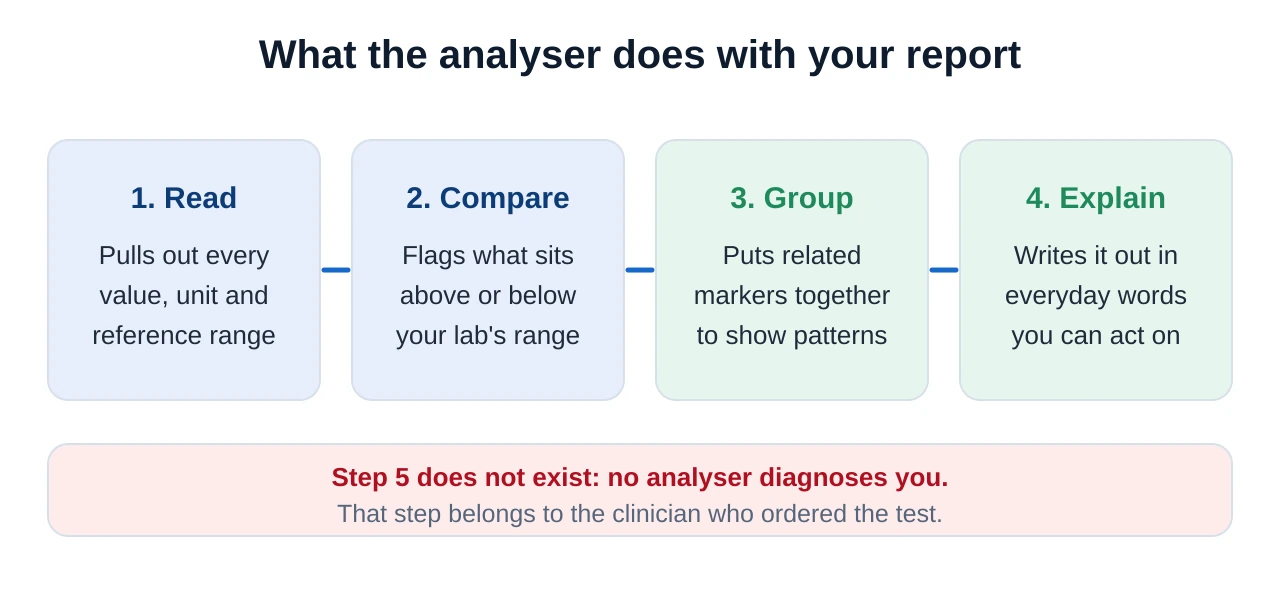
Step one is extraction. The tool has to find the numbers, whether you typed them in, uploaded a PDF or photographed a printout. Typed values are the most reliable; a slightly skewed phone photo of a dot-matrix printout is the least.
Step two is comparison. Each value is checked against a reference range — ideally the one printed on your own report, because ranges differ between laboratories and analysers. This is the most mechanical part of the job and the part AI does best.
Step three is grouping, and it is where a good tool separates itself from a mediocre one. Markers rarely mean much alone. Haemoglobin read with MCV, ferritin and RDW tells a story that none of the four tells by itself. A tool that presents twenty isolated lines has done less for you than one that says "these four belong together".
Step four is explanation: converting "Ferritin 14 µg/L (L)" into a sentence a person can actually use. That is the translation layer, and it is genuinely valuable — it is also where an AI can sound more certain than it should.
"Analyzer" or "analyser"? Both, and it does not matter
A quick note, because it confuses people searching. Analyzer is the American spelling and analyser the British one. The tools are the same tools; most of them are built for a global audience and indexed under the American spelling, while UK users naturally type the British one. We use "analyser" in our own writing because this is a UK site, but if you searched for an "ai blood test analyzer free" you are in exactly the right place.
The spelling does have one practical consequence: results that use the American spelling often use American units and reference ranges too. That matters more than the letter z, and we come back to it below.
What "free" actually means in practice
"Free" covers a surprising range of arrangements, and knowing which one you are in saves frustration halfway through.
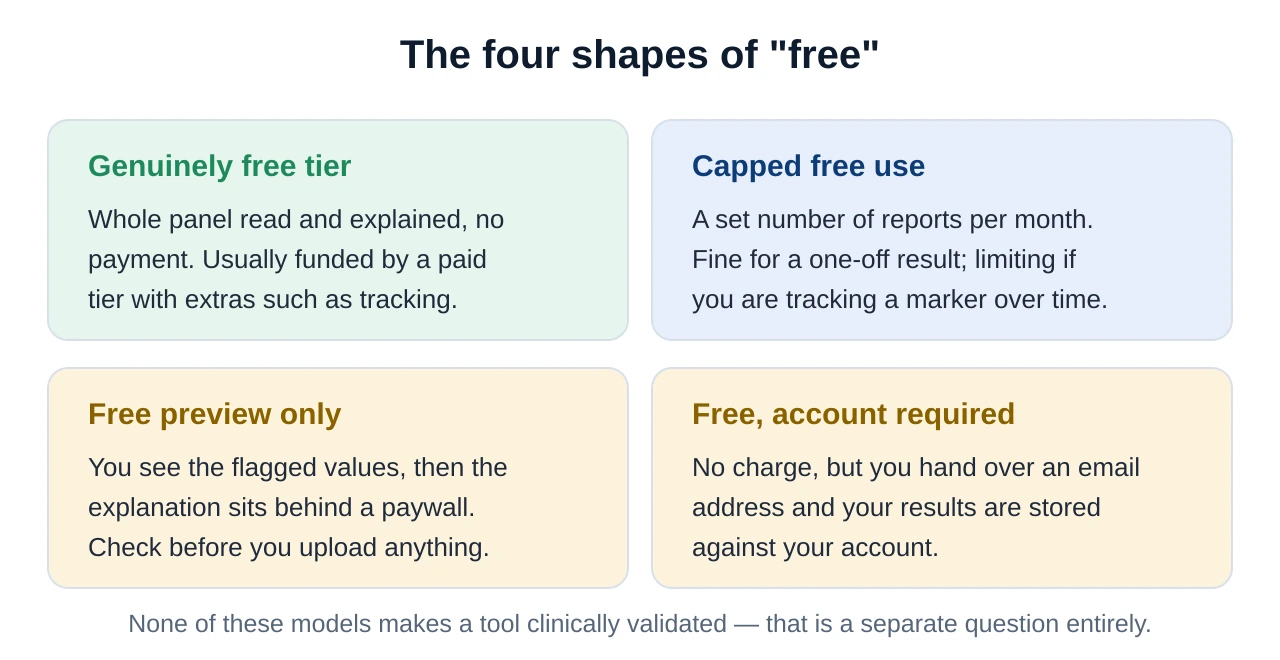
There is also a quieter cost that has nothing to do with money: your data. A free service is still a service, and health information is the most sensitive category there is. We deal with that properly in the privacy section below.
The four kinds of free tool you will find
Search for a free analyser and you will land on four quite different categories of product. They are not interchangeable, and the right one depends on what you actually want.
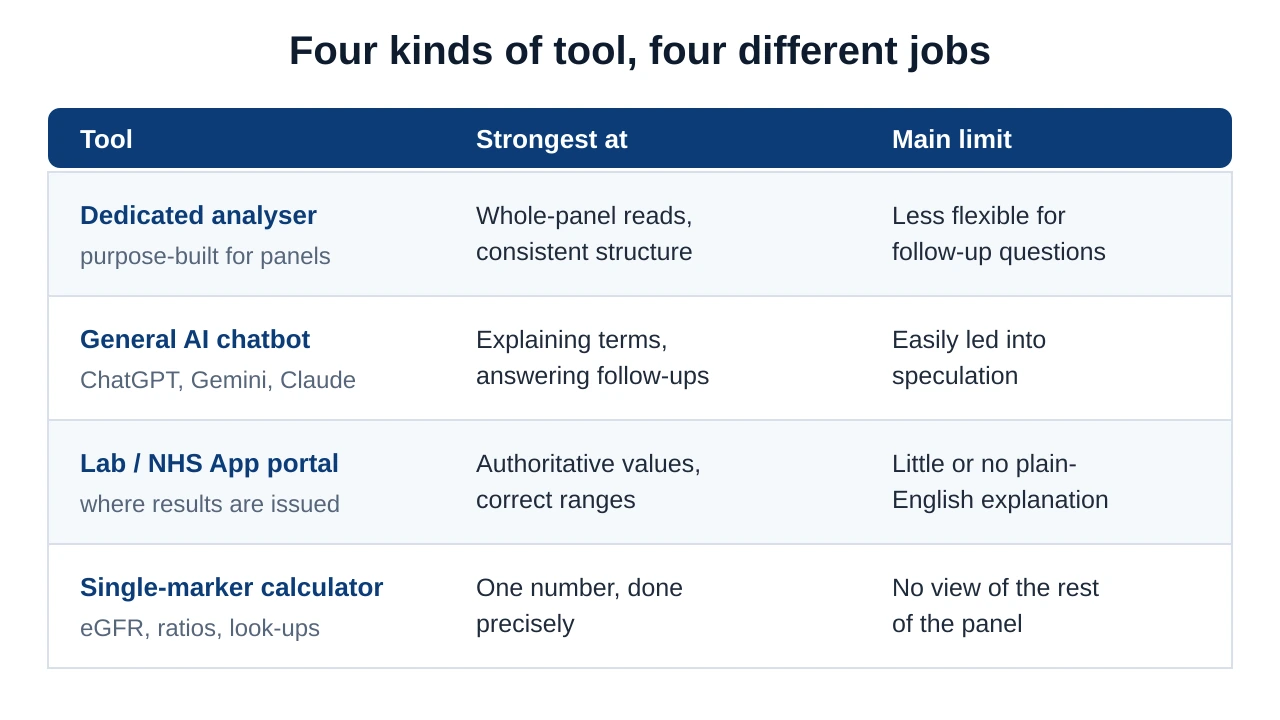
If you want to see how the dedicated tools and the general chatbots compare in detail, including how they handled real reports, we keep a running comparison of AI blood test analysers and a longer review of Kantesti, the analyser our editorial team rates highest.
Why "input lab results for diagnosis free" is the wrong search
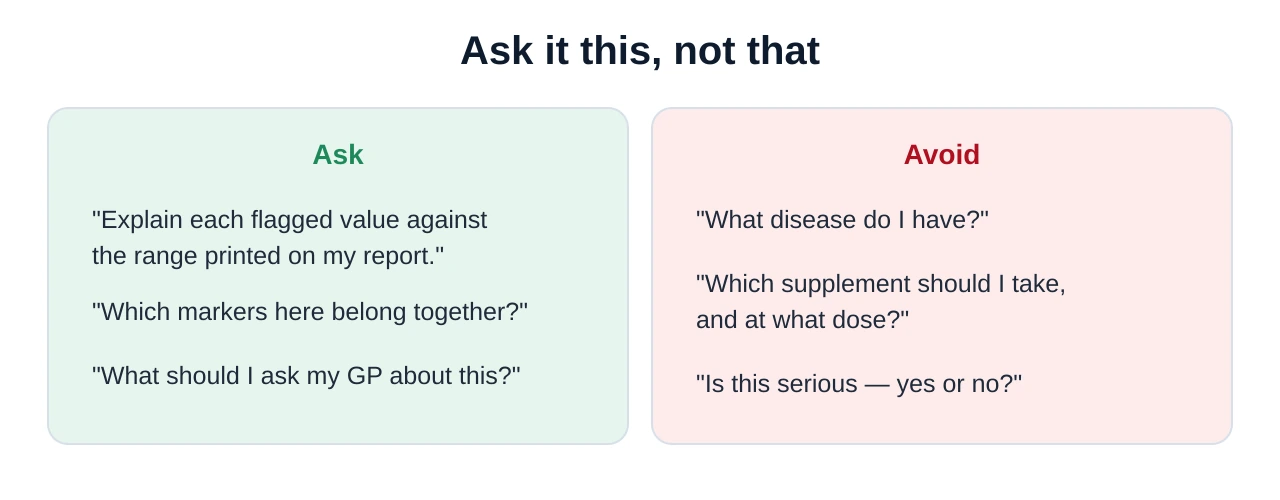
This phrase is typed thousands of times a month, and the instinct behind it is completely understandable: you have numbers, you want to know what is wrong. But it asks for something no free tool — and no AI at all — can responsibly give you.
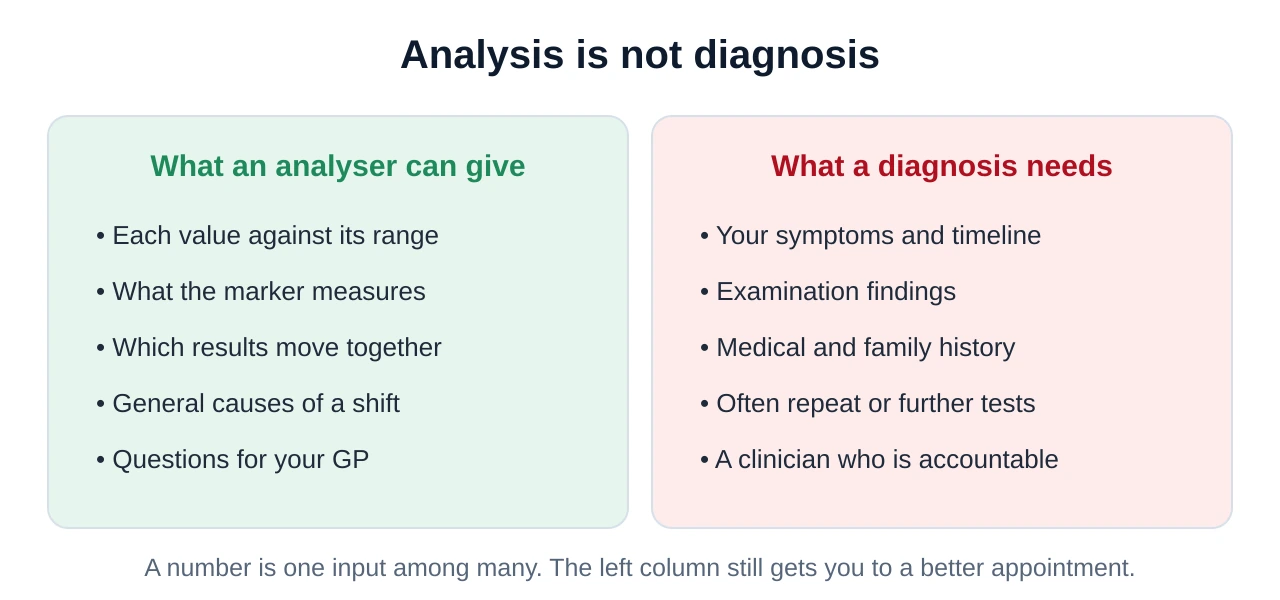
There is a second, more practical reason to be wary. A tool willing to name a disease from numbers alone is a tool willing to be wrong with confidence. The same raised white cell count can follow a chest infection, a course of steroids, a hard gym session or nothing identifiable at all. Without knowing which of those applies to you, "diagnosis" is guesswork dressed up as an answer.
What to enter: the minimum an analyser needs
The quality of the output depends almost entirely on the quality of the input. Three pieces of information per line are non-negotiable, and a fourth category of context changes how the whole panel should be read.
| What to enter | Example | Why it matters |
|---|---|---|
| The marker name | Ferritin | Abbreviations differ between labs; the full name avoids mix-ups |
| The value | 14 | The number itself, exactly as printed, decimals included |
| The unit | µg/L | The same marker is reported in different units in different countries |
| Your lab's range | 15–300 µg/L | Ranges vary by lab, analyser, age and sex — yours is the one that counts |
| Context | Fasted, morning sample, 34, female | Changes how several markers should be read |
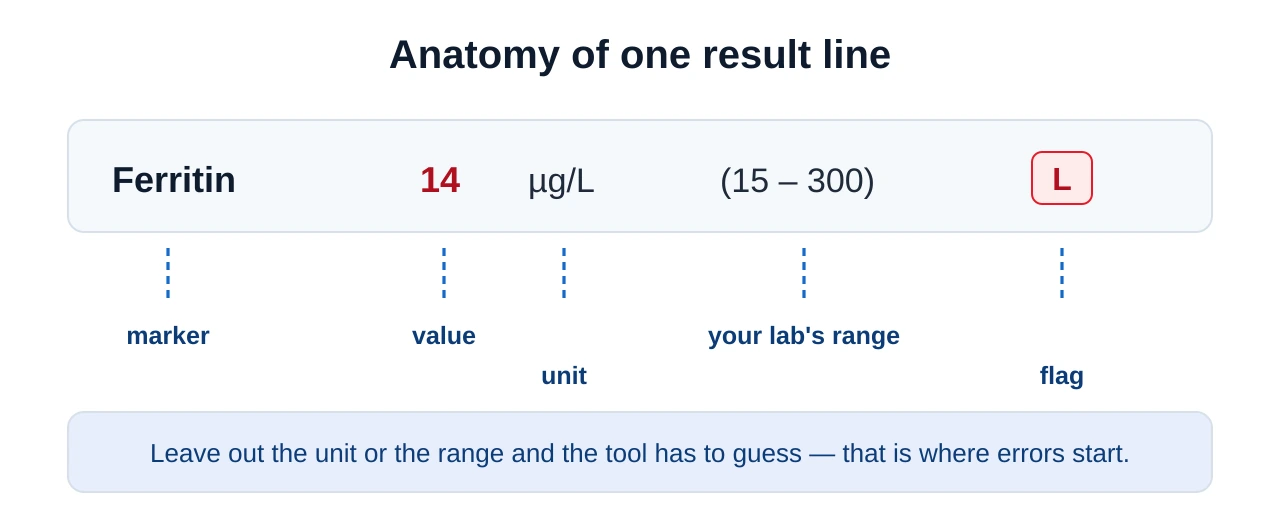
Units deserve special attention. Haemoglobin, for instance, is reported in g/L in the UK and in g/dL in the United States — a factor of ten apart. Glucose is mmol/L here and mg/dL there. A tool trained mostly on American data can read a perfectly normal UK haemoglobin of 135 g/L as catastrophic if it assumes g/dL. Entering the unit explicitly prevents the entire category of error. Our step-by-step guide to entering blood test results online for free covers the typing itself in more detail.
What a good analyser gives back
Here is what a useful output looks like in practice. The shape matters more than the wording: flagged values first, grouped markers second, plain-English meaning third, and a clear handover to a clinician at the end.
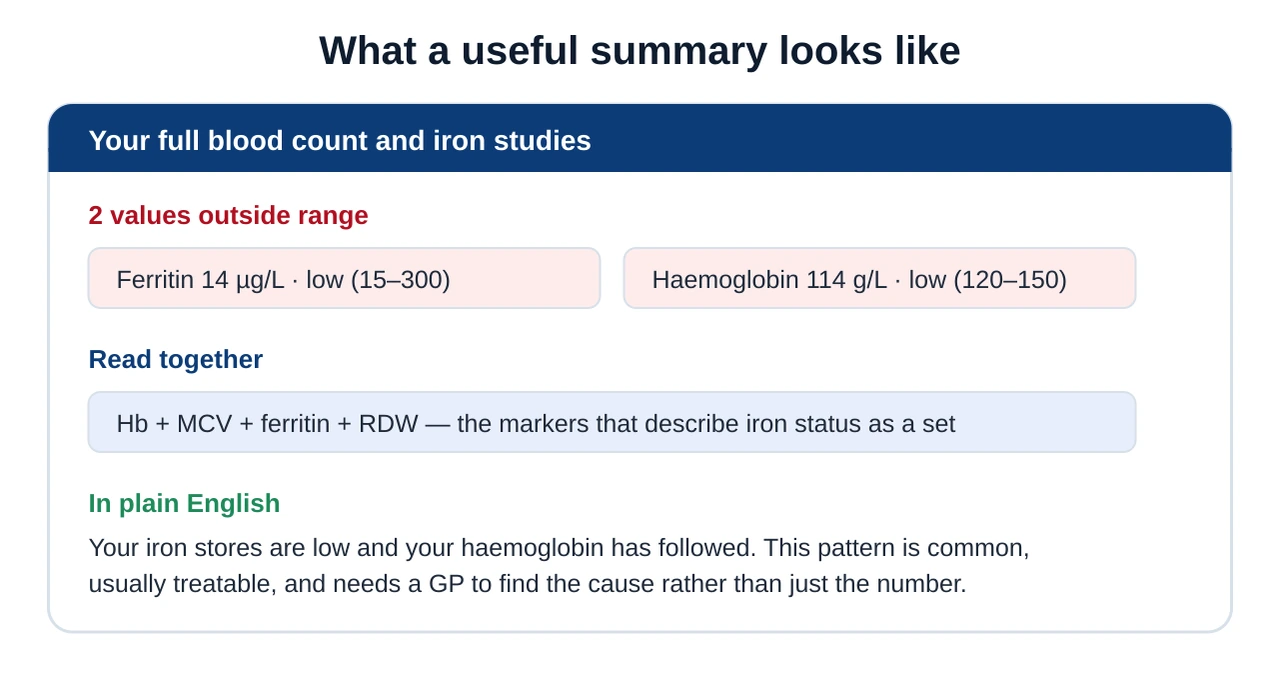
Notice what the example does not say. It does not name a disease, it does not suggest a supplement dose, and it does not tell you the cause. It gives you a pattern and hands you to a clinician — which is exactly the behaviour you want. If iron is what brought you here, our guide to ferritin and iron studies explains that pattern in depth.
How accurate are these tools, honestly?
Accuracy is not a single number, because the job is not a single task. Split it into the mechanical part and the judgement part and the picture becomes much clearer.
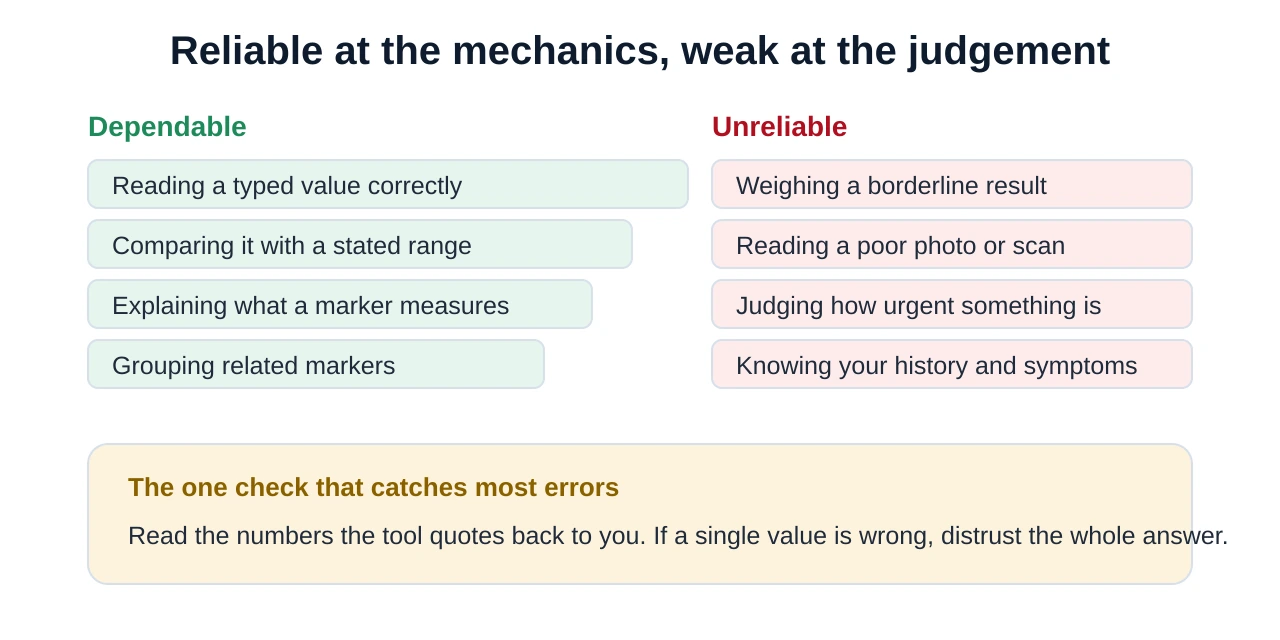
Two failure modes are worth naming. The first is misreading: an upload where 1.4 becomes 14, or where a column of ranges is matched to the wrong row. The second is overconfidence: fluent, plausible text stated with more certainty than the underlying evidence supports. Both are caught by the same habit — reading the numbers back against your own report before you believe anything built on top of them.
Privacy: three things to check before you upload
Blood test results are health data. In the UK they fall into a special category under data protection law, which is a reasonable prompt to slow down for a moment before dropping a PDF into an unfamiliar website.
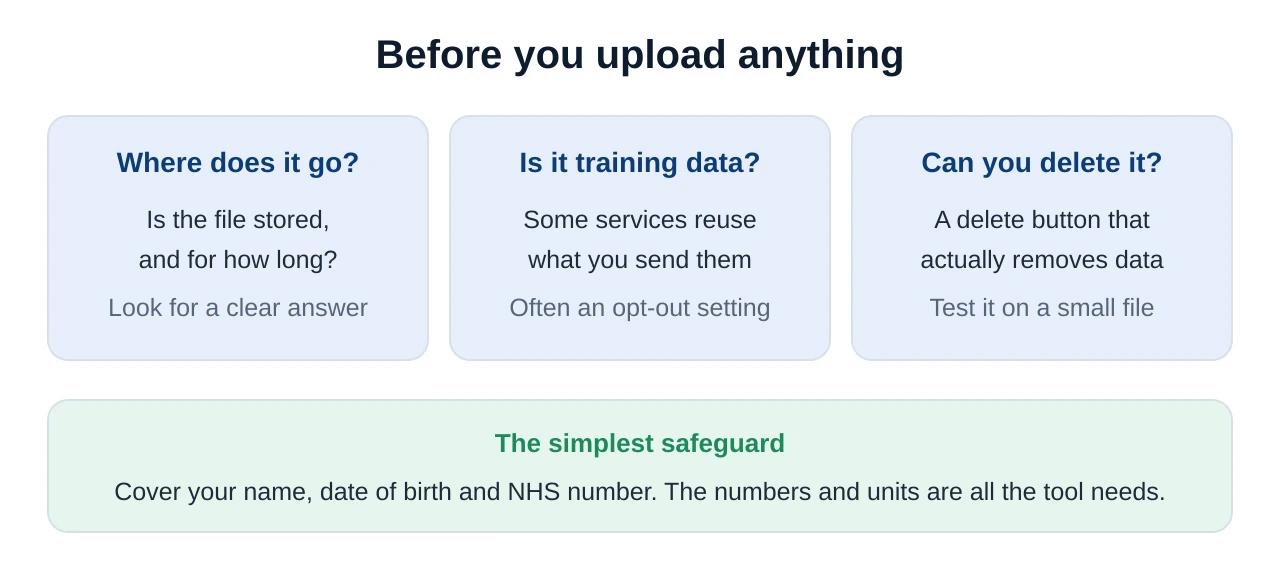
If a service cannot explain its data handling in language you can follow, the safe fallback is to type the values in by hand instead of uploading the document. Ten lines take two minutes, and nothing leaves your control except numbers.
Six steps to use a free analyser well
Put together, the practical method is short. Each step exists to head off one specific way these tools go wrong.
- Gather the whole report. Every page, not just the flagged line. Context is what turns isolated numbers into a pattern.
- Include units and ranges. Exactly as printed. This is the single biggest source of avoidable error, especially across US and UK units.
- Add the context. Fasted or not, time of day, age, sex, pregnancy, recent illness. Several markers read differently without it.
- Ask for patterns, not verdicts. "Which of these move together, and what can that combination indicate?" beats "what disease do I have?".
- Check the numbers it quotes. Compare each value against your report. One misquoted figure invalidates everything built on it.
- Turn it into GP questions. Two or three specific questions, and take the original report with you. That is the whole point of the exercise.
When to speak to your GP
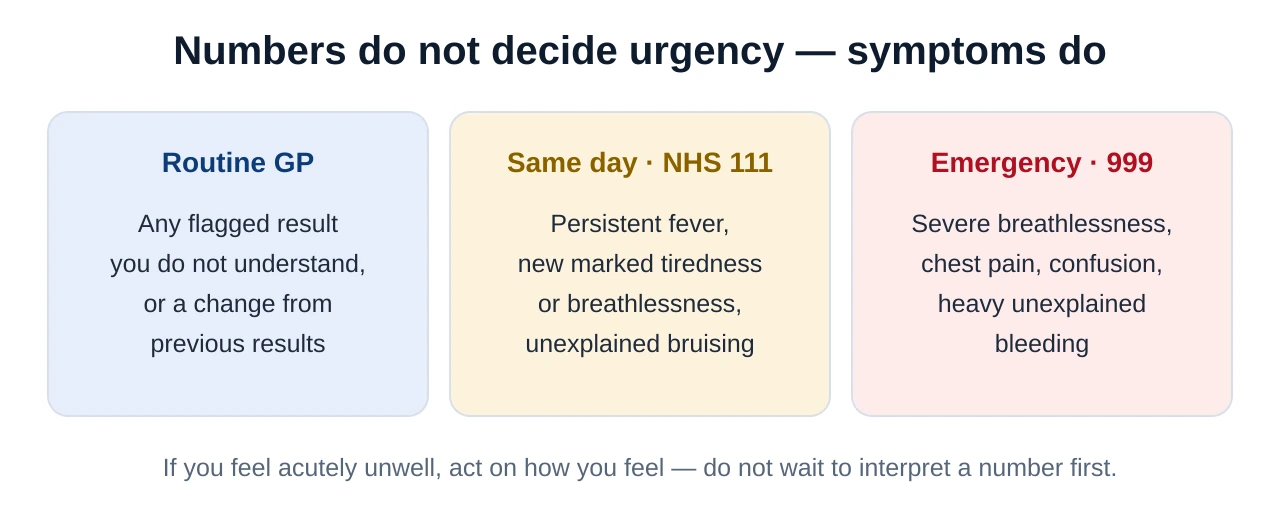
An analyser is preparation, not triage. Some situations need a person, and some need one today.
Run your panel through a free analyser
Upload or type in your report and Kantesti reads every value against its range, groups the markers that belong together, and writes the whole thing out in plain English — free, and ready to take to your GP appointment.
Analyse my results with KantestiIn short
A free AI blood test analyzer is a translation layer: it reads your values, compares each one against the range printed on your report, groups the markers that belong together and explains them in everyday language. That is genuinely useful, and for most people it turns an intimidating PDF into three sensible questions. It is not a diagnosis, and a tool that offers one is telling you something about itself rather than about your health. Enter the units and ranges as printed, add the context that changes a reading, check the numbers the tool quotes back, protect your identifiers before uploading anything — and take the summary, and the report, to your GP.
Frequently asked questions
Is there a genuinely free AI blood test analyzer?
What does an AI blood test analyzer actually do?
Can I input my lab results for a free diagnosis?
How accurate are AI blood test analysers?
Is it safe to upload my blood test report to an AI tool?
Should I use a dedicated analyser or a general chatbot?
Sources & references
- NHS — The NHS App — how to view your test results and GP record online in England.
- Lab Tests Online UK — Full Blood Count (FBC) — what the FBC measures and how results are reported.
- MedlinePlus — How to understand your lab results — reference ranges, units and why they vary.
- ICO — Special category data — why health data carries extra protection under UK GDPR.
- NICE NG8 — Anaemia management in chronic kidney disease — an example of how clinicians read markers in combination rather than alone.